Phenom Series
Phenom

Phenom is an ergonomic programmable split keyboard with a 3D case, a modular hot-swap system, 58 customizable keys, and support for a trackball, touchpad, or encoder on either half
Phenom Mini

Phenom Mini is a compact version of the ergonomic Phenom split keyboard with 46 customizable keys and support for a trackball, touchpad, or encoder on either half
Phenom Micro

Phenom Micro is an ultra-compact version of the Phenom keyboard, with only 40 customizable keys and support for a trackball, touchpad, or encoder on either half
Overview
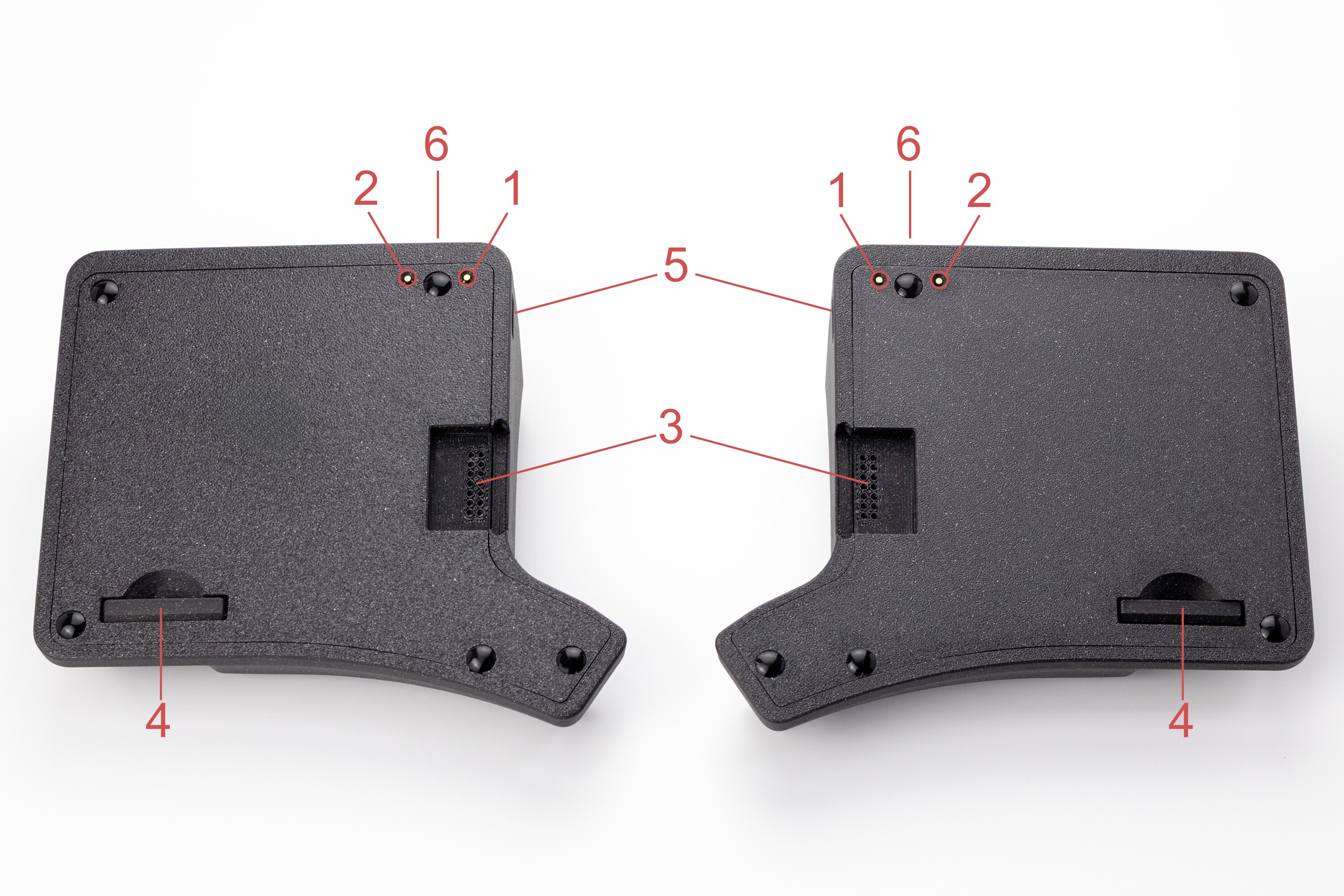
- RESET button
- BOOT button
- hot-swap socket for connecting modules
- case cover plug for using the keyboard without modules
- side USB-C connector for connecting the halves to each other
- interface USB-C connector for connecting to a computer
Connection
- Phenom works with devices running Windows, macOS/iOS, and Linux/Android
- The keyboard uses Plug and Play (PnP), so no additional driver installation is required
- The keyboard ships ready to use with the firmware current at the time of purchase
- Before connecting the keyboard to a computer, make sure the USB-C cable between the halves is firmly inserted
- When connecting the keyboard to a computer, make sure the USB-C cable is firmly inserted into the keyboard’s interface connector
Modules
Phenom supports a modular system for both halves of the keyboard
- Ball size: 38 mm
- Scroll Mode for smooth scrolling
- Sniper Mode for precise cursor control
- Text for convenient text navigation
Modular system connection features
- modules support hot swapping
- modules can be installed in the connectors on either half without reflashing
- when replacing one module with another, the configuration is preserved
- identical modules can be used on both halves
- if no module is installed, the connector is covered with a neat plug
- each module is configured separately, and the active layer is shown by indicator lighting
Configuration
To remap keys and configure the keyboard, use the graphical configurator Entropy
Firmware update
Firmware files and update instructions are available here
Care and Maintenance
- Periodically clean dust and dirt from the case with a dry or slightly damp cloth
- For the trackball module: keep the ball, ceramic bearings, and ball cavity clean
Support
The keyboard comes with a 3-year warranty and service support.
If you have any questions about setup, firmware, or operation, please contact the Ergohaven Telegram group or knowledge base